
Melvor Idle 2 Skills and Mastery Guilds Guide
Plan Melvor Idle 2 skill training with quest goals, action rates and Reach Level. Learn how task-based Mastery Guilds differ from the original game.
How do skills and mastery fit together?
In Melvor Idle 2, skill training raises your levels and supplies resources for other activities. Mastery Guilds add task-based progression, including combat mastery. They replace the per-item Mastery mechanic of the original Melvor Idle, so an old item-Mastery route should not be treated as a sequel guide.
The Early Access store lists 25 skills with a maximum skill level of 99. The launch update opens Astrology, Herblore and Agility beyond the demo, adds four Mastery Guild ranks, and introduces further skill shop purchases. Choose training according to the requirement, resource or bonus you need next.
Build a goal from the result you need
Start with the outcome, then work backward. Use the following choices in order:
| Your immediate need | What to inspect | Useful next action |
|---|---|---|
| Advance a quest | Requirements beneath the quest synopsis | Train an unmet skill requirement |
| Produce a required item | Its displayed production requirements | Gather the missing ingredient or train the prerequisite |
| Improve a combat loadout | Item stats and equipment requirements | Train or produce toward that specific piece |
| Progress a Mastery Guild | Current task wording and conditions | Select an eligible action that also helps another goal |
This order keeps your plan tied to your save. It also avoids spreading time across unrelated skills just because their levels are low. Follow the beginner route if you have not yet reached a clear next objective.
Read the action tracker before committing
The current action tracker shows hourly rates for the selected action, including Skill XP, items used, items gained and relevant combat statistics.
- Select the action you are considering.
- Check its current XP rate and the items it consumes or produces.
- Compare that result with the outcome you need. High XP is not automatically the right choice when the next quest needs a material.
- Check your supply in the bank if the action spends inputs.
- Revisit the tracker after changing an action or equipment rather than relying on an old number.
Treat these as rates for the current setup. Do not multiply them into an unconditional overnight guarantee: your goal, available supplies and stop conditions still matter. The offline planning guide covers that distinction.
Use Reach Level for a specific breakpoint
The launch build adds a Reach Level stop condition. Set the desired level when your goal is a known quest requirement or unlock, so the skill stops automatically at that target.
For a practical short session:
- Read the level requirement you are trying to satisfy.
- Select an appropriate available action in that skill.
- Set Reach Level to that requirement.
- When it is reached, return to the activity that prompted the training.
This is especially useful when quest progression gives you several possible skills to work on. Complete one relevant target, check the quest again, and decide on the next requirement from the updated state.
Match guild tasks to your existing plan
Open the relevant Mastery Guild and read the actual task conditions before beginning. Task progress depends on those conditions; repeatedly making the same item only helps if it satisfies the task.
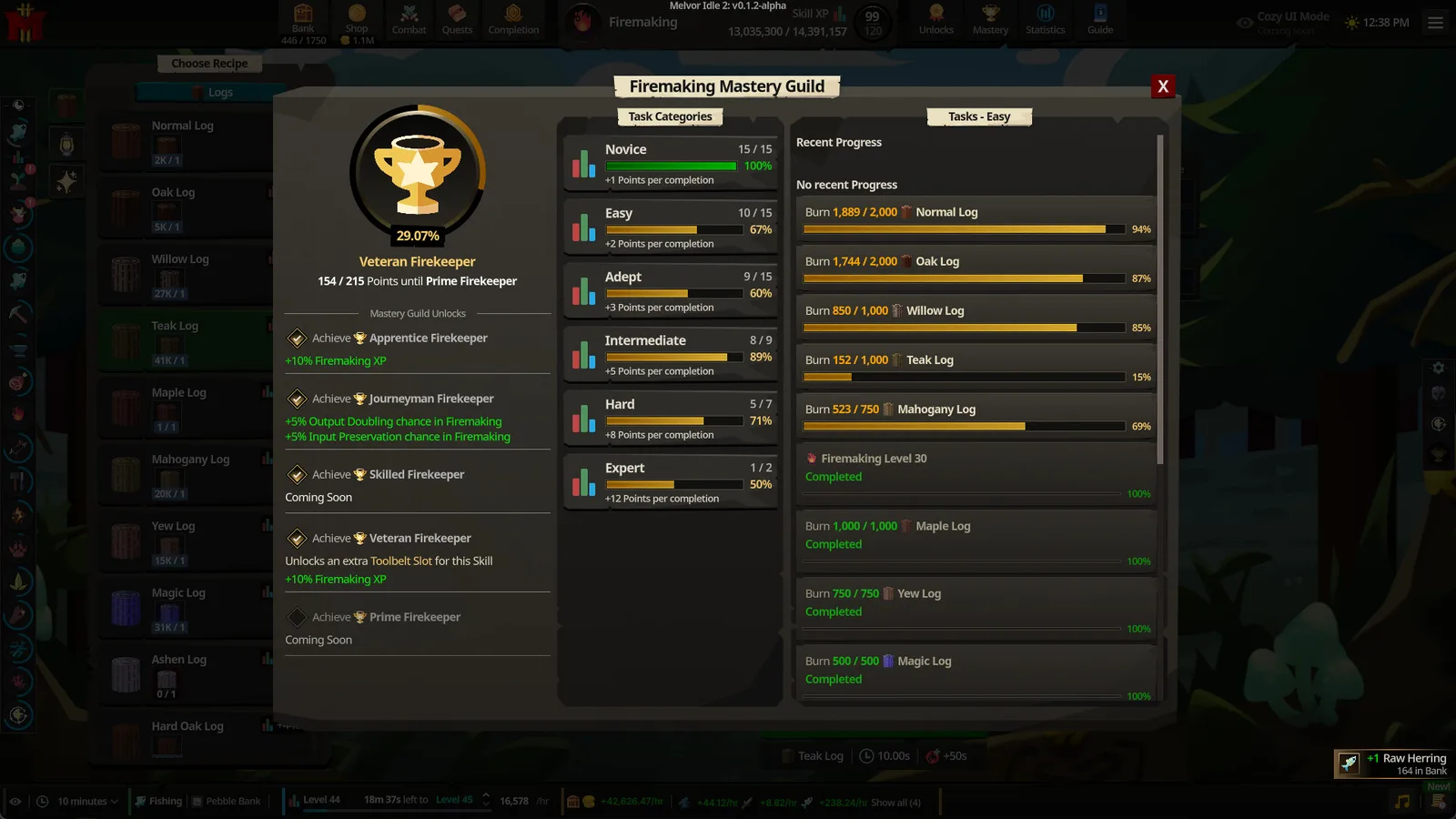
Prefer an overlap when possible: a task whose action also produces an ingredient you need, trains toward a quest requirement, or supports your planned combat setup. That preference is an editorial planning rule, not a claim that every guild task has an equally efficient route.
The launch patch fixes several guild display and progress issues, including task sorting and tasks with conditions failing to update. If a task looks wrong:
- Confirm that you are running the launch build rather than relying on a demo-era screenshot.
- Read its conditions again, including the action and item involved.
- Check the displayed task progress after an eligible action.
- If the mismatch persists, record the task wording, selected action and game version for a bug report through the support guide.
What changed from the demo?
Astrology, Herblore and Agility are available in Early Access. They support other skills in different ways:
| Skill | Role described by the developer | What to inspect before choosing a goal |
|---|---|---|
| Astrology | Permanent skill bonuses and special content unlocks | Whether the displayed bonus helps the activity you plan to run |
| Herblore | Potions for skills, with stronger effects at higher tiers | The potion’s effect, ingredients and the activity that will use it |
| Agility | Techniques that unlock content and utility equipment for selected non-combat skills | Which technique unlock serves your current resource or training need |
The launch preparation post identifies these skills as part of the response to demo-era ranged-ammunition and rune-production bottlenecks. That makes their relevant bonuses worth checking before repeating an old demo supply route. It does not establish one fixed upgrade order for every character.
Early Access also adds four guild ranks with new tasks and bonuses. Re-read your newly available tasks after transferring a demo save. For combat mastery, start with equipment and combat preparation instead of transferring assumptions about the original game’s mastery rewards.
Sources
- Steam store: 25 skills, level 99 and current action tracking.
- June development update: task-based guild system.
- September development update: Astrology and Combat Mastery Guild.
- Launch preparation: Astrology, Herblore and Agility roles.
- Early Access patch notes: new skills, four ranks, Reach Level and guild fixes.
Checked 18 November 2026 for the Early Access launch.
Related Articles
guides
Melvor Idle 2 Bank Guide: Tabs, Tags and Equipment Sets
Organise the Melvor Idle 2 bank with named tabs, item tags and placeholders. Check equipment sets, sale quantities and supplies before your next training action.
guides
Melvor Idle 2 Beginner Guide: First Skills and Quests
Start Melvor Idle 2 with onboarding and quest goals. Learn how to choose skills, check action rates, organise supplies and prepare your first offline session.
guides
Melvor Idle 2 Quest Guide: Requirements, Act 2 and Stuck Steps
Find Melvor Idle 2 quest requirements, plan skill targets for Act 2 and follow the documented save-load fix when a completed quest step stays in progress.
Was this helpful?
Thanks for the feedback!