
Melvor Idle 2 Combat Guide: Gear, Loadouts and Armour
Prepare for Melvor Idle 2 combat: compare gear with TAB, select a Quick-Equip combat-style filter and read armour rules before testing your loadout.
What should you check before combat?
Before combat in Melvor Idle 2, check which loadout is active, which combat style its weapon uses, and what changes when you equip an item. The game includes Melee, Ranged and Magic, but its combat has new mechanics. The developers explicitly designed weapon choices to matter more than following one best-in-slot weapon from the original game.
This guide covers the Early Access equipment interface and preparation before a fight. For a first character, complete the beginner steps and relevant onboarding before using a combat requirement as your next goal.
Compare equipment against the correct loadout
The launch build adds item stats to equipment tooltips and a comparison against your existing loadout in Combat.
- Find the equipment item you are considering and hover it.
- Read its displayed stats alongside the comparison.
- Press TAB to cycle which loadout the tooltip compares against.
- Stop at the loadout you intend to use for the encounter.
- Inspect the resulting equipment in Combat before starting the fight.
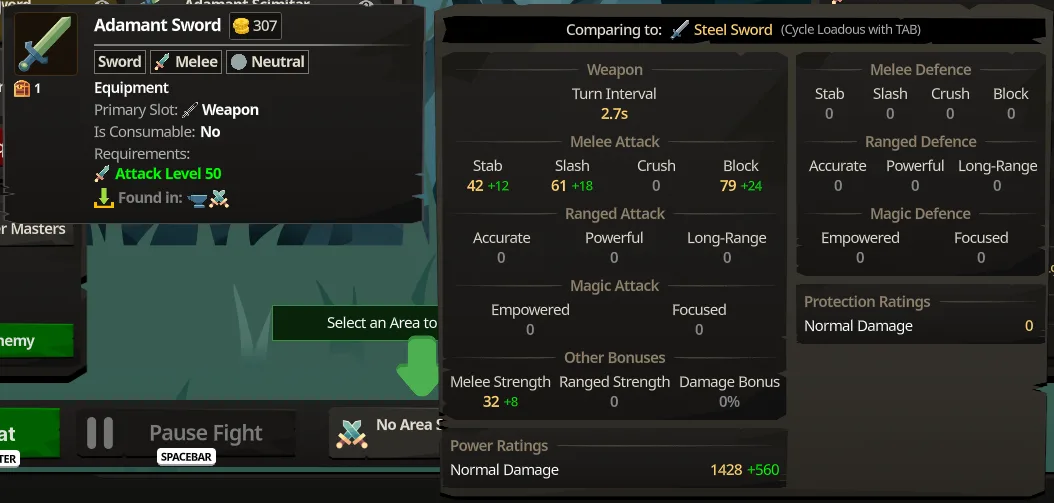
The important decision is the comparison target. A piece can look like an upgrade against one loadout without being appropriate for another style. Name equipment sets clearly in the bank and equipment system so you can identify the setup you are comparing.
If a weapon seems missing, inspect the Quick-Equip filter
Clicking the weapon slot opens Quick-Equip. In the launch build, its weapon filter defaults to the combat style of the currently equipped weapon. If you have no weapon equipped, it defaults to Show All.
That means a weapon from another style may be hidden by the current filter rather than missing from your inventory.
- Check the current filter when switching between Melee, Ranged and Magic.
- Select the style you want to inspect, or Show All when you want the full list.
- Choose the item and then recheck the equipment comparison and intended loadout.
Use the filter to reduce clutter, but do not let its default choose your strategy. The skills and mastery guide can help connect an equipment goal to the training you actually need.
Read armour information before trusting an old setup
Armour can break in combat. The launch notes both fix player armour not breaking and add an explanation to the Armour tooltip in Combat. Read that tooltip for the current rules; a demo session affected by the bug is not evidence that armour remains intact indefinitely.
Melee gear’s scaling negative Magic Defence was also changed at launch to a fixed small negative value. Reinspect the actual item stats instead of using a demo-era comparison or assuming a number from the original game.
For a newly assembled setup, make the first session short and watch the combat state, health and resources. If it is not performing as intended, stop and review the setup. An equipment comparison alone does not prove that the encounter is safe to leave running overnight. Use offline planning only after deciding what action is appropriate for the time away.
Choose a target from a real objective
A useful first target is an enemy required by your current quest or a combat task you can inspect in game. Open the quest requirements or Mastery Guild task and identify exactly what needs to be completed before changing gear.
The launch notes also increase GP rewards from early Slayer monsters, with Slimes and Bees given as examples. This identifies a changed reward source; it does not establish either enemy as the best money method for every character. Check your own available content and current combat performance before choosing a longer session.
When the interface behaves unexpectedly
The developers note that the expanded equipment tooltips can behave awkwardly in some layouts because of their size. If a comparison is difficult to read, confirm the intended loadout and inspect the item again rather than equipping blindly.
Launch fixes also address a stuck Equipment Loadout popup and problems switching between two Magic loadouts during a special attack. If you can still reproduce an issue, preserve your save, note the exact actions that trigger it, and follow the troubleshooting and bug-report steps.
Sources
- Official Steam store: combat styles and refined combat mechanics.
- Official June update: weapon choices and combat design.
- Official Early Access patch notes: item comparisons, TAB, Quick-Equip, armour and fixes.
Checked 18 November 2026. No claim of hands-on testing or a verified idle-combat build is made.
Related Articles
guides
Melvor Idle 2 Bank Guide: Tabs, Tags and Equipment Sets
Organise the Melvor Idle 2 bank with named tabs, item tags and placeholders. Check equipment sets, sale quantities and supplies before your next training action.
guides
Melvor Idle 2 Beginner Guide: First Skills and Quests
Start Melvor Idle 2 with onboarding and quest goals. Learn how to choose skills, check action rates, organise supplies and prepare your first offline session.
guides
Melvor Idle 2 Quest Guide: Requirements, Act 2 and Stuck Steps
Find Melvor Idle 2 quest requirements, plan skill targets for Act 2 and follow the documented save-load fix when a completed quest step stays in progress.
Was this helpful?
Thanks for the feedback!